Stop Guessing What's in Your OCI Environment: A Practical Guide to OCI Resource Analytics
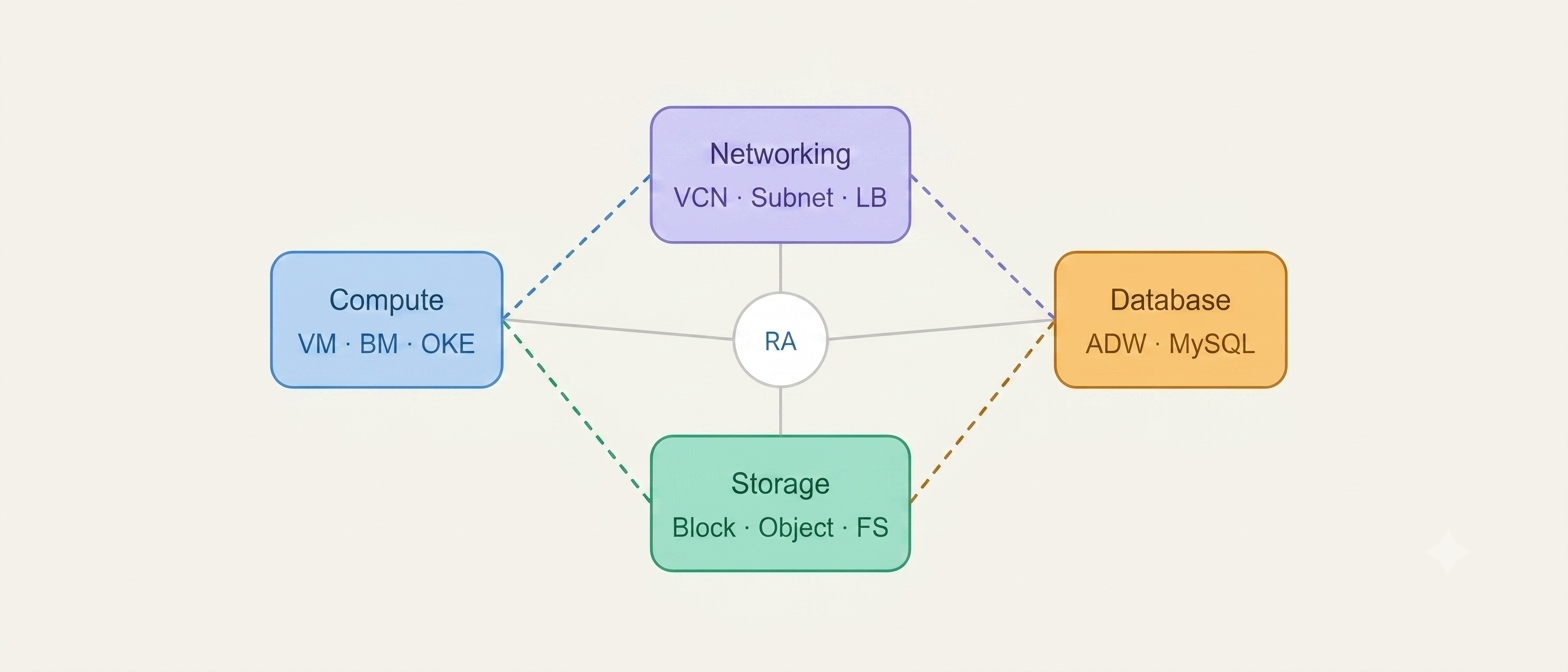
Figure 1: OCI Resource Analytics Arcihtecture overview.
As Oracle Cloud environments grow, simply knowing what resources exist is no longer enough. Teams also need to understand how those resources are connected, who owns them, whether they're still being used, and what impact a change might have before they click Delete. That's exactly the problem OCI Resource Analytics is designed to solve. Instead of giving you another inventory list, it builds a continuously updated knowledge graph of your cloud infrastructure that you can explore visually, query with SQL, and integrate into dashboards for operations, governance, and FinOps. In this guide, we'll look at what OCI Resource Analytics actually does, how it works behind the scenes, what it costs, and—most importantly—whether it's the right fit for your OCI environment.
This article is intended for Cloud Architects, OCI Administrators, Platform Engineers, DevOps teams, FinOps practitioners, and anyone responsible for managing medium to large Oracle Cloud environments.
Why Cloud Visibility Matters
Every cloud journey starts out simple.A handful of virtual machines. One VCN. A few databases. Maybe an Object Storage bucket or two. Everything feels manageable. Fast forward six months. Your organization has multiple projects, multiple teams, multiple environments, and resources spread across several OCI regions. Suddenly nobody remembers:
- Which application owns a particular subnet?
- Whether an old load balancer is still being used.
- Which block volumes are orphaned.
- Who created that Kubernetes cluster.
- Whether deleting a route table will break production.
The OCI Console still lists every resource. But a list alone doesn't explain the relationships between them. And that's where operational mistakes begin.
Many production outages are caused not because engineers don't know what resources exist—but because they don't know what depends on those resources before making a change.
What is OCI Resource Analytics?
OCI Resource Analytics is Oracle's cloud visibility and resource intelligence service that helps you understand what resources exist, how they're connected, who owns them, and how they change over time. Rather than showing a flat inventory of cloud assets, Resource Analytics continuously builds a live model of your OCI environment by collecting metadata from supported OCI services and storing it in an Oracle Autonomous datawarehouse inside your own tenancy. This gives your team a single source of truth that can be explored visually through dependency graphs, queried using standard SQL, or consumed by dashboards for governance, operations, security, and FinOps.
Imagine your OCI environment is an entire city. A traditional resource inventory is simply an address book listing every building. OCI Resource Analytics gives you the complete city map. You can instantly see:
- Which roads connect each building.
- Which buildings are abandoned.
- Who owns every property.
- Which roads become blocked if one bridge is removed.
- Which neighbourhoods are costing the most to maintain.
Instead of isolated resources, you understand the complete picture.
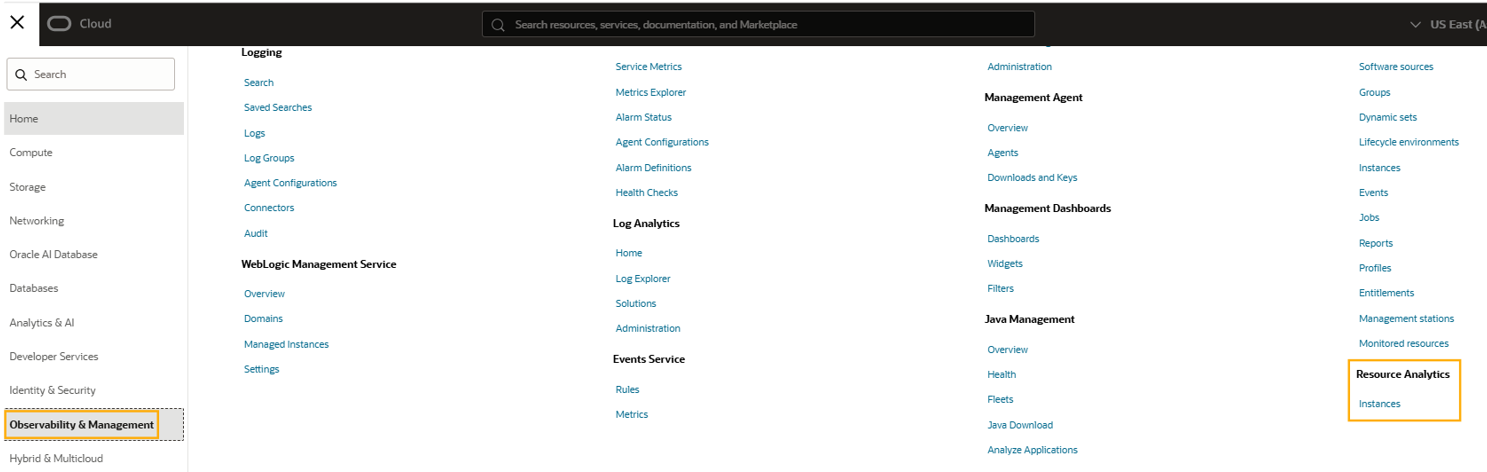
Figure 2: OCI Resource Analytics Navigation.
Why OCI Search Isn't Enough
Many administrators ask an obvious question: "Can't I already search resources from the OCI Console?" The answer is yes—but OCI Search and OCI Resource Analytics solve very different problems. OCI Search is excellent for locating resources quickly. OCI Resource Analytics helps you understand your infrastructure.
| Feature | OCI Search | OCI Resource Analytics |
|---|---|---|
| Find resources | ✅ | ✅ |
| Relationship graph | ❌ | ✅ |
| Historical metadata | ❌ | ✅ |
| SQL queries | ❌ | ✅ |
| Dependency analysis | ❌ | ✅ |
| Oracle Analytics dashboards | ❌ | ✅ |
| FinOps reporting | Limited | Rich reporting |
OCI Search helps you answer: Where is my resource?" Resource Analytics helps answer: What depends on this resource, who owns it, and what happens if I change it?
How Resource Analytics Works
When Resource Analytics is enabled, Oracle provisions an Autonomous AI datawarehouse within your OCI tenancy. The service continuously synchronizes metadata from supported OCI services into the datawarehouse, where it is organized into relational tables and graph structures. Because everything remains inside your tenancy, your infrastructure metadata never leaves your OCI environment. Engineers can then explore the collected information in several ways:
- Visual dependency graphs
- SQL queries
- Oracle Analytics Cloud dashboards
- Graph Studio
- Custom reporting and automation

Figure 3: OCI Resource Analytics provisioning
Unlike many third-party cloud inventory tools, OCI Resource Analytics runs completely inside your own tenancy. Your resource metadata, configuration history, and relationships remain under your organization's control. You can also enrich the collected data with your own business information such as application ownership, cost centres, environment classifications, or CMDB identifiers.
Why Teams Adopt Resource Analytics
As OCI environments grow, different teams often maintain their own spreadsheets, inventory exports, or scripts to understand infrastructure. Over time these quickly become inconsistent.Operations may see one picture.Security another.Finance yet another. Resource Analytics removes these silos by creating one continuously updated inventory that everyone works from.
Imagine a network administrator wants to delete an old subnet.Without dependency visibility, they might spend hours asking application owners whether anything still uses it—or worse, remove it and discover a production workload depended on it.With Resource Analytics, the dependency graph immediately reveals every connected resource before any change is made.
This shift—from static inventories to relationship-aware infrastructure—is what makes OCI Resource Analytics one of the most valuable governance services Oracle has introduced in recent years.
What Can OCI Resource Analytics Actually Do?
Oracle documentation lists the capabilities of Resource Analytics, but the real value becomes clear when you look at everyday operational challenges. Whether you're planning a migration, troubleshooting an outage, reducing cloud costs, or preparing for an audit, Resource Analytics gives you the context that traditional resource inventories cannot. Let's look at the four capabilities you'll use most often.
1. Understand Dependencies Before Making Changes
Infrastructure changes often have unintended consequences because cloud resources rarely exist in isolation. A compute instance depends on a subnet.That subnet belongs to a VCN.The VCN may contain load balancers, route tables, gateways, Kubernetes clusters, databases, block volumes, and dozens of other interconnected resources.Deleting or modifying one component without understanding these relationships can easily affect production workloads.
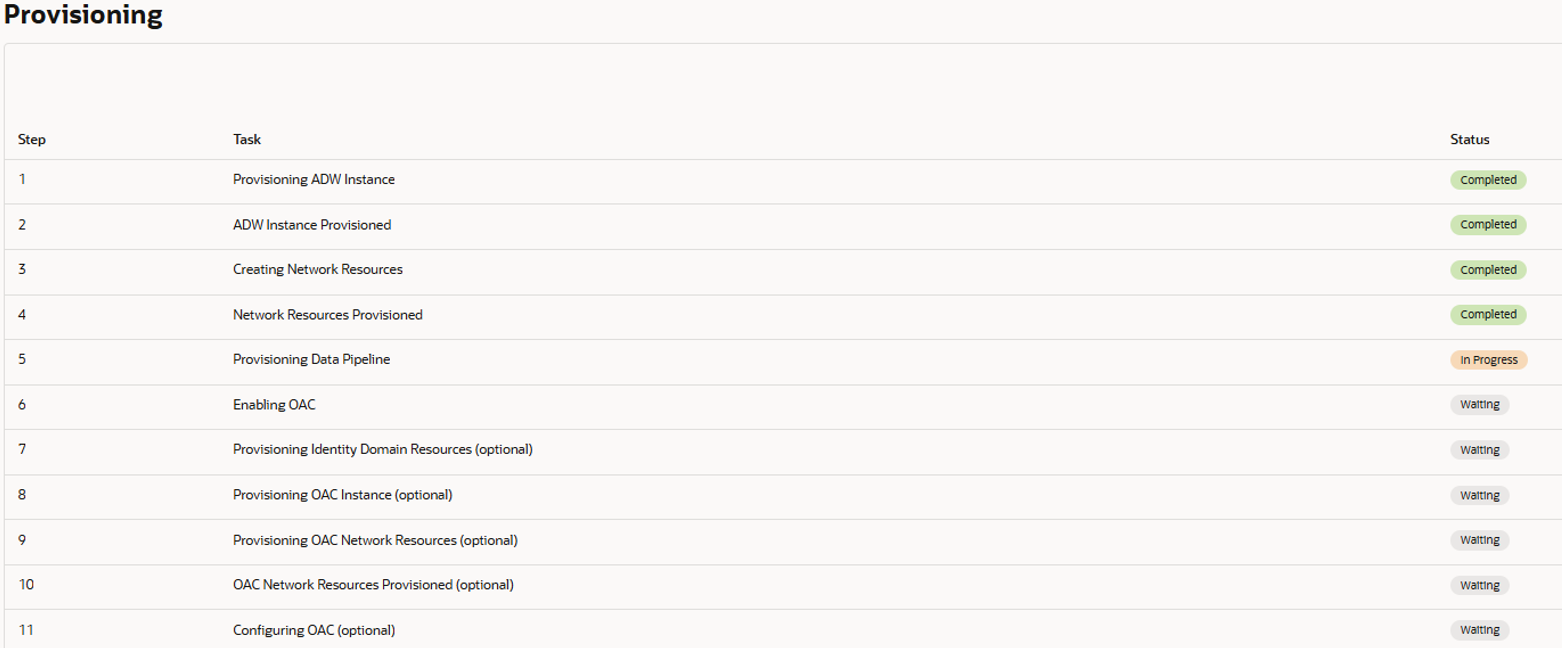
Figure 4: Resource Analytics - OCI provisioning components.
Before deleting an old subnet, Resource Analytics immediately shows every VM, Load Balancer, OKE cluster, route table, security list, and database that still depends on it. Instead of asking multiple teams or manually checking resources, the dependency graph provides the answer in seconds.
Always review the dependency graph before deleting networking components or shared infrastructure. This simple step can prevent costly outages and significantly reduce deployment risk.
2. Query Your Infrastructure Using SQL
One of the most powerful—and surprisingly underrated—features of Resource Analytics is that your cloud inventory becomes queryable using standard SQL. Because the metadata is stored inside an Autonomous AI database, engineers can answer complex operational questions without writing OCI CLI scripts or REST API integrations.
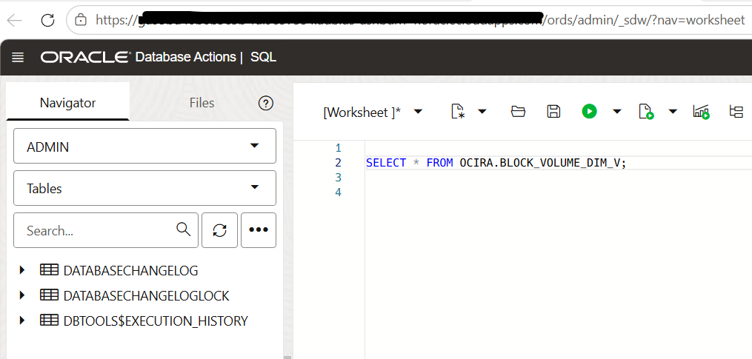
Figure 5: Running SQL queries against your OCI inventory.
Here are a few practical examples.
Find Development Virtual Machines
SELECT * FROM OCIRA.COMPUTE_INSTANCES WHERE TAG_ENV='DEV';
Identify Orphaned Block Volumes
SELECT * FROM OCIRA.BLOCK_VOLUMES WHERE ATTACHED='NO';
Locate Untagged Resources
SELECT * FROM OCIRA.RESOURCES WHERE OWNER IS NULL;
List Idle Compute Instances
SELECT * FROM OCIRA.COMPUTE_INSTANCES WHERE CPU_UTILIZATION < 5;
Instead of maintaining dozens of custom inventory scripts, operations teams can answer many day-to-day questions using familiar SQL syntax.
3. Build Dashboards for Different Teams
Every team views cloud infrastructure differently.Operations wants health and availability. Security wants governance.Finance wants cost attribution.Compliance wants audit evidence.Rather than maintaining separate inventories, Resource Analytics integrates with Oracle Analytics Cloud (OAC) to create dashboards from the same underlying dataset.
| Team | Typical Dashboard |
|---|---|
| Operations | Resource inventory, health, dependencies |
| Security | Untagged assets, public resources, governance |
| FinOps | Cost allocation by compartment, project, owner |
| Compliance | Ownership reports, inventory history, audit evidence |
| Architecture | Dependency maps and service relationships |
Everyone works from the same continuously updated inventory instead of maintaining separate spreadsheets or manually exported reports.
4. Identify Hidden Cloud Waste
Cloud waste rarely comes from one expensive mistake.Instead, it accumulates gradually.Unused virtual machines.Forgotten development environments.Detached block volumes. Unattached public IPs.Resources that nobody remembers creating.Over time these quietly increase cloud spend.
Resource Analytics makes these issues much easier to identify by combining inventory data with ownership and tagging information. Typical findings include:
- Orphaned block volumes
- Unused boot volumes
- Idle development environments
- Resources without owners
- Missing business tags
- Duplicate infrastructure
- Abandoned Kubernetes clusters
Many organizations discover their first cloud cost savings simply by identifying resources that no longer serve a business purpose. Visibility is often the first step toward optimization.
Real-World Use Cases
The value of Resource Analytics becomes much clearer when viewed through real operational scenarios.
| Scenario | How Resource Analytics Helps |
|---|---|
| Decommissioning infrastructure | Shows downstream dependencies before deletion. |
| Cloud migration | Maps application relationships for planning. |
| Incident investigation | Visual dependency graph speeds root-cause analysis. |
| Governance reviews | Finds missing tags and ownership gaps. |
| Cost optimization | Highlights idle or forgotten resources. |
| Architecture documentation | Provides a continuously updated infrastructure map. |
The biggest advantage of OCI Resource Analytics isn't that it inventories your cloud—it helps you understand the relationships between resources. That context reduces operational risk, simplifies troubleshooting, and gives teams greater confidence when making infrastructure changes.
How OCI Resource Analytics Works
Although Resource Analytics feels like another OCI console feature, it's actually built on top of Oracle's Autonomous AI datawarehouse. When you enable the service, Oracle provisions the required analytics infrastructure inside your own OCI tenancy. Nothing runs outside your environment, and your metadata never leaves Oracle Cloud. Rather than collecting performance metrics, Resource Analytics continuously synchronizes metadata from supported OCI services into a centralized repository where relationships can be queried, visualized, and analyzed.
High-Level Architecture
At a high level, the service works in four stages.
| Stage | Description |
|---|---|
| 1. Resource Discovery | Metadata is collected from supported OCI services across selected regions and tenancies. |
| 2. Data Synchronization | The collected metadata is synchronized into an Autonomous AI datawarehouse. |
| 3. Relationship Mapping | Dependencies between resources are automatically identified and stored. |
| 4. Visualization & Query | Users explore the data through SQL, Graph Studio, or Oracle Analytics Cloud dashboards. |
Oracle continuously adds support for new OCI resource types. As additional services become supported, Resource Analytics automatically expands its inventory model without requiring you to redesign your dashboards.
Your Data Never Leaves Your Tenancy
Security is often the first concern when introducing an inventory platform.Fortunately, Resource Analytics follows the same security principles as other OCI managed services. Everything—including the Autonomous AI database—runs inside your tenancy.Your infrastructure metadata, historical resource information, dependency graph, and custom business attributes remain under your administrative control.
You can enrich Resource Analytics with your own datasets such as:
- Application ownership
- Business unit mappings
- Cost centres
- Environment classifications
- CMDB identifiers
- Compliance labels
This allows technical resource information to be combined with business context for richer reporting and governance.
How Much Does OCI Resource Analytics Cost?
This is one of the most common questions—and the answer is refreshingly straightforward.The resource synchronization process itself is free. However, Resource Analytics runs on top of an Autonomous AI datawarehouse, and that underlying infrastructure is billed according to Oracle Cloud pricing. In other words, you're paying for the analytics platform—not for collecting the resource inventory.
| Component | Required | Cost | Purpose |
|---|---|---|---|
| Resource Synchronization | Yes | Free | Collects OCI resource metadata into the AI database. |
| Autonomous AI Datawarehouse | Yes | Paid | Stores metadata, relationships, SQL tables, and graph data. |
| Oracle Analytics Cloud (OAC) | No | Paid | Provides dashboards and visual analytics. |
The default deployment typically provisions an Autonomous AI datawarehouse starting at approximately 4 ECPUs with 1 TB of storage. Actual consumption scales based on workload, storage, and usage, so costs vary between environments.Always verify current sizing recommendations and pricing before deployment.
How to Estimate the Cost
- Open Oracle Cloud Cost Estimator.
- Select Autonomous AI datawarehouse.
- Configure approximately 4 ECPUs.
- Enter your estimated storage.
- Review monthly projected costs.
If you're evaluating the service for the first time, begin without Oracle Analytics Cloud. Explore the SQL and Graph capabilities first, then add dashboards later if your organization needs them.
Prerequisites Before You Enable Resource Analytics
Before provisioning Resource Analytics, ensure the following prerequisites are satisfied.
| Requirement | Why It Matters |
|---|---|
| OCI Tenancy | An active OCI tenancy is required. |
| IAM Permissions | Administrator privileges or delegated policies to provision required services. |
| Autonomous Database Quota | Sufficient ECPU limits must be available. |
| Region Selection | Choose the regions whose resources should be synchronized. |
| Tenancy Selection | Optionally monitor multiple OCI tenancies. |
| Oracle Analytics Cloud | Required only if dashboards are needed. |
Before enabling Resource Analytics, review your tenancy quotas for Autonomous Database resources. Insufficient ECPU limits are one of the most common reasons deployments fail.
Treat Resource Analytics as part of your cloud governance platform—not merely an inventory tool. The greatest value comes when technical metadata is combined with ownership, cost allocation, and operational processes.
Should Your Team Use OCI Resource Analytics?
Like most enterprise cloud services, OCI Resource Analytics isn't something every tenancy needs on day one. Its value grows as your OCI footprint becomes larger, more distributed, and more difficult to understand through the OCI Console alone. If your organization manages multiple environments, shared infrastructure, or dozens (or hundreds) of cloud resources, Resource Analytics can quickly become an essential operational tool. On the other hand, if you're running a small proof-of-concept or a handful of resources, the native OCI Console may already provide enough visibility.
When Resource Analytics Is a Good Fit
| Situation | Why It Helps |
|---|---|
| Multiple OCI regions | Provides a consolidated inventory across regions. |
| Multiple OCI tenancies | Offers centralized visibility into distributed environments. |
| Frequent infrastructure changes | Dependency graphs reduce operational risk. |
| FinOps initiatives | Improves ownership and cost attribution. |
| Security & Compliance | Identifies missing tags, ownership gaps, and governance issues. |
| Platform Engineering | Provides a live infrastructure knowledge base. |
| Cloud modernization | Supports migration planning with dependency mapping. |
Organizations running medium or large OCI environments with multiple application teams, shared networking, governance requirements, and ongoing cloud growth will benefit the most.
When It May Not Be Worth the Cost
Resource Analytics is a premium capability built on top of Autonomous AI database. For very small environments, the ongoing operational cost may outweigh the benefits.
- Single-region OCI deployments
- Only a handful of resources
- No SQL expertise within the team
- No governance or compliance requirements
- Very limited cloud budget
- Proof-of-concept or learning environments
Resource Analytics doesn't replace good cloud governance.Consistent tagging, IAM design, naming standards, and ownership processes remain essential. The service enhances governance—it doesn't create it.
Who Benefits the Most?
| Role | Primary Benefit |
|---|---|
| Cloud Architects | Understand application dependencies before designing or changing infrastructure. |
| OCI Administrators | Centralized visibility into all cloud resources. |
| Platform Engineers | Faster troubleshooting using dependency graphs. |
| DevOps Teams | Infrastructure discovery during deployments and migrations. |
| Security Teams | Governance reporting and ownership visibility. |
| FinOps Teams | Cloud cost attribution and waste identification. |
Advantages and Limitations
| Advantages | Limitations |
|---|---|
| Complete cloud inventory | Additional service cost |
| Dependency visualization | Requires SQL knowledge for advanced analysis |
| Oracle Analytics integration | Best suited for medium to large environments |
| Runs inside your tenancy | OCI-only solution |
| Supports governance & FinOps | Not intended for application monitoring |
Frequently Asked Questions
Is OCI Resource Analytics free?
No. Resource synchronization is free, but the service requires Autonomous AI datawarehouse, which is billed separately. Oracle Analytics Cloud is also an optional paid component.
Does my resource data leave OCI?
No. The metadata remains inside your OCI tenancy and is managed using Oracle's managed services.
Can I monitor multiple OCI tenancies?
Yes. Resource Analytics supports collecting inventory from multiple OCI tenancies and multiple OCI regions.
Does it replace OCI Monitoring?
No. OCI Monitoring collects metrics and performance information.Resource Analytics focuses on inventory, relationships, governance, and infrastructure visibility.
Can I query the inventory using SQL?
Yes. One of the strongest capabilities of Resource Analytics is the ability to query infrastructure metadata using standard SQL.
Final Verdict
OCI Resource Analytics fills an important gap between simply knowing what resources exist and understanding how your cloud environment actually works. If your organization struggles with dependency visibility, cloud governance, cost optimization, or operational complexity, Resource Analytics provides valuable context that traditional inventories cannot. For small OCI deployments, however, the native OCI Console may be sufficient until your environment grows.
The decision ultimately comes down to one question:
"Does your team need infrastructure intelligence—or just an inventory?"
If your answer is infrastructure intelligence, Resource Analytics is well worth evaluating.